Showing posts with label CPU. Show all posts

Monday, May 27, 2024

Synth Microprocessor Applications

Something people forget is how much was done with so little compute power in the early days of the digital synth and how powerful modern microprocessors have become today. Rough order of performance from top to bottom.

[edit] 20240607 Thanks to all the comments and suggestions from r/synthdiy. Added Ksoloti Core rev 0.5/Axoloti Core rev 1.2 which are both 168MHz STM32's.

Microprocessor Cores CPU Speed (MHz) Application Description
Snapdragon X Elite 12 Up to 3800 Copilot+PC 12-core Oryon CPU, 4nm process
Apple M1 8 Up to 3200 Mac Mini,
MacBookAir/Pro,
iPad Pro,
iPad Air
8-core CPU
4 performance
4 efficiency cores
5nm process
Intel Core i3-1115G4 2/4 1.7-3.0 GHz base
4100 turbo
Ableton Push 3 Dual Core Hyperthread
Apple A10X Bionic 6 Up to 2380 iPad Pro (2nd gen) 6-core CPU
3 high-performance Hurricane cores and
3 energy-efficient Zephyr cores
10 nm process
Raspberry Pi 5B 4 2400 ARM Cortex A76 @2.4GHz
Raspberry Pi 4B 4 1800 Korg Opsix Mk2,
Wavestate Mk2,
Modwave Mk2
ARM Cortex-A72 (ARM v8)
64-bit SoC at 1.8GHz
ARM? 4 1800
MPC Live/2/One/+/X
MPC 61/MPC X SE
1.8GHz quad-core
2GB RAM
4GB RAM
VisionFive 2 4 1500 RISC V starFive Jk 1110 64bit SOC
with RV64GC, up to 1.5GHz
Raspberry Pi 3B 4 1200 Korg Opsix,Wavestate,
Modwave,MonomeNorns
Critter&GuitariOrganelle
ARM Cortex-A53 SoC processor
running at 1.2 GHz,
Atom D510 2 1660 Korg Kronos x86 standard Intel D510MO motherboard
with a dual-core Atom D510 at 1.66GHz.
Raspberry Pi Zero 2W 4 1000 ARM Cortex-A53 CPU at 1GHz.
Raspberry Pi Zero W 1 1000 Mini Dexed 1GHz ARM11 single core
Teensy 4.1 1 600 M8 Trakcer, ARM Cortex-M7
Daisy DSP
(Cortex-M7)
1 480 Daisy DSP ARM Cortex-M7 MCU
running at 480MHz
Renesas RZ/A1L 1 400 Synthstrom
Deluge
ARM Cortex-A9 core
running at 400MHz
with 3MB of on-chip SRAM
ESP32 2 Up to 240 Woovebox Tensilica Xtensa LX6
Raspberry Pi Pico 2 Up to 133 pikoCore, zeptoCore ARM Cortex-M0+ Dual-core
STM32F446ZET6 1 180 Korg NTS-1 ARM Cortex-M4 core
Teensy 3.6 1 180 MicroDexed,
MicroDexed Touch
ARM Cortex-M4F
STM32F427/429
STM32F427
1 168 Ksoloti Core rev 0.5
Axoloti Core rev 1.2
STM32F429ZGT6
ARM Cortex-M4 core
DSP563xx 1/2


5/8
upto 150 Virus A/B/C/TI/TI2
Waldorf MicroQ
Nord Lead3/Modular
Korg MS2000/Microkorg
NovationNova/Supernova
24bit DSP
Adafruit NeoTrellis M4 1 120 Adafruit NeoTrellis M4 with
Enclosure and Buttons Kit Pack
ARM Cortex-M4 Single Core 120Mhz
ArduinoDue 1 84 Linnstrument ARM Cortex-M3 Single Core 84Mhz
STM32l476VGT6
(or 475)
1 80 Plinky ARM Cortex-M4
STM32 Blue Pill 1 Up to 72 ARM Cortex-M3
Arduino UNO R4 1 48 ARM Cortex-M4 microprocessor
and a 16-fold increase in memory 32-bit
Spin Semiconductor FV-1 DSP 2? 33.55 Various Effect Pedals Parallel Processing DSP
sample rate at 32.768 KHz.t
ATmega328 1 8/16 ATmega328
Motorola 68000 1 7 to 25 Yamaha TX16W
Akai MPC 60?
Amiga/AtariST/Mac
16/32bit
YM21290 EGS "envelope" chip
YM212805 OPS "operator" chip
1 2 Yamaha DX7 Generated frequency+envelope data
Generated sound waveforms
I think the chips were about 2Mhz
SID 6581 1 1 Various Hardware Interfaces
Various Software Emulations
Commodore 64
Three oscillators
Four distinct waveforms per audio oscillator
One multi mode filter
Three ADSR volume envelopes
Three ring modulators
Oscillator sync for each oscillator
Two 8-bit ADC
External audio input
Random number/modulation generator
I think the chips were about 1Mhz

Thursday, November 26, 2015

By the Power of .... um Elections ? (Or how to monitor battery life performance)

Introduction

This post was triggered by three issues with my mobile devices.
  • Unpredictable battery life from my iPhone 4s
  • Constant cooler fan operation on my notebook (Samsung NP350U2B) is noisy and annoying
  • Lower then expected battery life from my new tablet (Asus VivoTab 8 M80TA)
The basic solution for all of these was to;
  • Use battery logging software, 
  • Apply a bit more discipline in the daily use cycle
    (eg charge at night, run all day to near shutdown, only top up charge if needed)
  • Be more mindful of what apps are being used relative to battery life performance. 
In a bit more detail for each device

iPhone 4s

My phone was purchased in late 2011 so is currently about 4 years old and probably about double the expected life span of any fanboy (or girls) expected utilisation. So I guess this means I have some interesting problems and Apple really doesnt care given their lack of responise to the only support avenue available to me.

I have been a long time user of Battery Life Pro (by Kdan Mobile Software) but I am not sure if it is still available on iTunes. Its a useful little utility which can be used to log your battery percentage over time (little quirk you have to look at the batter graph or it will not log the data!).  This data can be accessed using a tool like CopyTrans to access the Batter Life pro documents sandbox which contains the settings.plist file which store the battery log data in XML.

What this has shown me is how quickly the battery is discharging. What I have noted is that apart from obvious use, it has good and bad days with really no rhyme or reason. I think this is primarily due to two reasons.
  • Poor cellular coverage so it is connnected and disconnecting a lot.
  • Misbehaving apps that are chewing up more then they should.  This can be monitored using Settings|General|Usage|Battery Usage by comparing the 24h usage to the 7 day usage.
  • High motions sensor usage if being moved around a lot while using sensor based apps
I have also recently started to use Battery Doctor (by KS Mobile) which is a useful utility to monitor what days you have part or fully charged your battery. Since I have started doing this I have noticed less crashing from high percentages on my battery.

I realise this is an "old" phone and the problems might not apply to many but the tecquires could be used to trouble shoot other battery problems.  I might go to the local Apple shop and torture them at some stage and will update if I get a better response then just buy a new phone.

Notebook and Tablet

These two devices are operating Windows 7.0 and 8.1  respectively. I have found some useful programs that I have used identify excessive and ensure a more normal level power usage.

Resource Monitor

This app is built into windows and can be accessed via the Search function for "Resource Monitor" or as a button on the Performance tab of Task Manager.  This app gives an over all picture of CPU, network and drive access as well as a list of applications individual utilisation. If you sort these by Average you can get a clear idea of who are the primary hogs.

Open Hardware Monitor

Open hardware monitor is a useful app to monitor depending upon your available hardware sensors things like CPU speeds/temperature/load%/power, hard drive temperature and RAM memory load%/actual used or available.  This can be used to monitor up to the previous 24h and logs to a daily file if so desired.  Things I find useful from this;
  • Notice the amount of time the CPU cores go into Turbo mode, or strange cycles or sustained periods of high CPU speed.
  • CPU speed features are not always correlated to CPU load.
  • CPU temperature is a good indicator of load and the HD temperature is not a bad indicator of ambient temperature.

BatteryMon 

BatteryMon (by Passmark Software) is a great program to monitor your battery discharge rate in real time. It gives you a visual indication of discharge and other stats such as time running, time remaining etc. It can also log to a file.

Powercfg

In windows 8.1 (not 7) powercgf has a -batteryreport option that produces a detail battery report including graphics in HTML.  This is useful as it seems to continue to operate when in Sleep mode so you can monitor drain during this time (eg identify its really asleep, not still on wifi etc).

Just a temporary check to a HTML report file that will be over written use the following batch.

powercfg /batteryreport
"C:\Program Files\Internet Explorer\iexplore.exe" c:\users\pac\battery-report.html 

As the report only goes back three days, I have also written a batch that can output to a report file with the current date and time.

set hour=%time:~0,2%
if "%hour:~0,1%" == " " set hour=0%hour:~1,1%
;echo hour=%hour%
set min=%time:~3,2%
if "%min:~0,1%" == " " set min=0%min:~1,1%
;echo min=%min%
set secs=%time:~6,2%
if "%secs:~0,1%" == " " set secs=0%secs:~1,1%
;echo secs=%secs%

set year=%date:~-4%
;echo year=%year%
set month=%date:~7,2%
if "%month:~0,1%" == " " set month=0%month:~1,1%
;echo month=%month%
set day=%date:~4,2%
if "%day:~0,1%" == " " set day=0%day:~1,1%
;echo day=%day%
set dayL=%date:~0,3%
;echo dayL:=%dayL%

set datetimef=%year%%month%%day%_%hour%%min%%secs%_%dayL%

echo datetimef=%datetimef%

powercfg /batteryreport /output %1%datetimef%.html
"C:\Program Files\Internet Explorer\iexplore.exe" %userprofile%\%1%datetimef%.html 

Battery Bar Pro

Battery Bar Pro is an excellent tool to see the resulting instantaneous usage of your battery in your task bar.  You can set up in Preferences that  click on the battery bar icon you can toggle between current power consumption, time remaining, percent remain (and battery capacity in mAh which is not much use really).

I use this frequently on the power consumption setting like a speedometer for my battery. I know what speed (power discharge rate in watts) I should be going at and make sure its not over by too much.  Being able to quickly toggle to get an estimated time left on battery is useful too.

Tuesday, July 14, 2015

CPU Power Sagnation

A while a go (2008) I did a study on what drove me to upgrade my computer (the large green circles with date and MIPS labels). Typically I found this was around 5 to 10 times the speed of my previous computer was the tipping point to buy a new computer.  This has typically meant a three year life cycle for my computers.

I determined this from a simplistic analysis of the Drystone (MPS) benchmarks over the history of my computer life (roughly since 1982). Interestingly enough there seems to be a power function which has a reasonable fit over time for both the Drystone results and processor speed MHz.


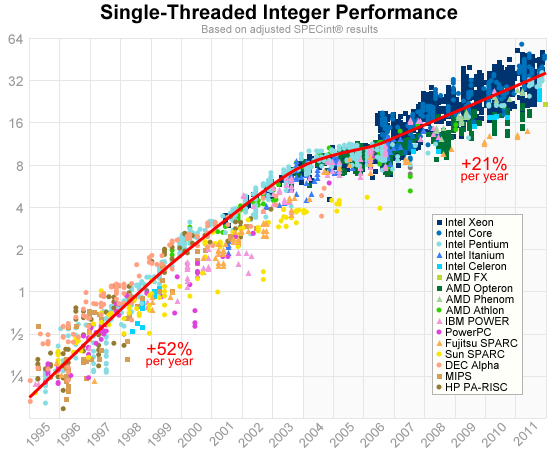
My reason for revisiting this study is lately I have been underwhelmed by the latest mobile CPU's coming out from Intel and feel they have been stagnating or in some cases going backwards in performance. Interestingly enough I came across a similar study that concluded a 52% yearly increased per year prior to 2004 and 21% post 2004.

Even though my data is obviously much sketchier I think you can see a similar change in gradient pre and post 2004.  An interesting point is that we both developed similar graphs independently of each other pretty much interrogating the same questions about rate of change of CPU speed.


When you put these rates in terms of my tendency to update every 3 years it becomes quite dramatic. As you can see why I am questioning my normal 3 year update may now be a 5 year update.


1 Year Performance Improvement 3 Year Performance Improvement 5 Year Performance Improvement
Pre2004 1.52 3.44   7.85
Post2004 1.21 1.77    2.59

Interestingly enough my intuition that there was something going on with CPU speeds was enough to perk my interest sufficiently to investigate my computer upgrade history was only a few years after the 2004 tipping point observed in the study above.

I guess I am not the only one with shrinking  consumer demand and pushing product cycles.  Call me cynical ... is Intel's delay due to production or to extend current product life cycle.